
Google has quietly rolled out one of the biggest visual redesigns across Workspace in years.
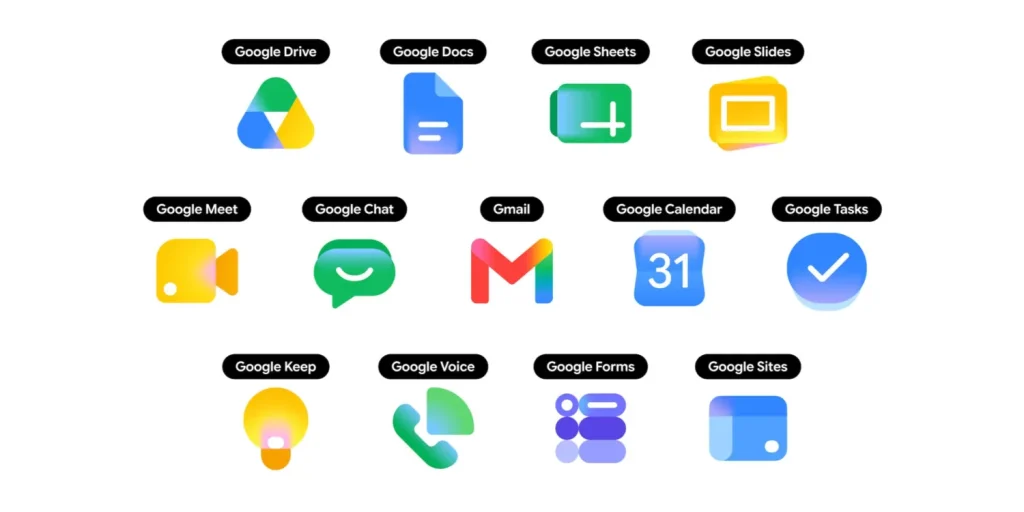
At first glance?
It looks like a simple icon refresh.
But honestly…
this update says a lot more about where Google is heading next.
The company is moving away from:
- flat design
- rigid color systems
- uniform app identity
…and toward something far more important in the AI era:
instant recognition, contextual usability, and emotionally softer interfaces.
This isn’t just a design update.
It’s part of a much larger shift happening across Google’s ecosystem.
And most people are only noticing the colors.
Hire Imran Nadir for Google Ads and Digital Marketing Consultation.
What Changed in Google Workspace Icons?
Google redesigned several Workspace icons including:
- Gmail
- Google Drive
- Docs
- Sheets
- Slides
- Meet
- Calendar
- Keep
- Forms
- Chat
- Tasks
- Sites
- Voice
The older design language relied heavily on:
- flat colors
- hard edges
- consistent four-color branding
The new direction introduces:
- gradients
- softer shadows
- fluid depth
- rounded visuals
- more app-specific color identity
The result?
Apps now feel more visually distinct from one another instead of blending into the same “Google color system.”
Gmail’s New Icon Feels More AI-Era Friendly
Gmail kept its recognizable “M” shape.
But Google replaced the old flat color structure with smoother gradients and softer transitions.
That sounds minor.
But psychologically?
It changes how the product feels.
The old Gmail icon looked:
- functional
- corporate
- structured
The new one feels:
- adaptive
- modern
- fluid
- AI-native
And that’s exactly the direction Google wants its ecosystem to move toward.
Google Drive Finally Feels Cleaner
The old Drive icon always felt slightly overloaded visually.
The new version simplifies the visual weight by reducing unnecessary color segmentation and moving toward cleaner gradient transitions.
Small detail.
Big usability improvement.
Especially in environments where people scan apps quickly:
- mobile launchers
- browser tabs
- Chrome OS
- Workspace sidebars
- AI-assisted workflows
This redesign improves speed of recognition.
And in modern UX?
Recognition speed matters more than decoration.
Docs, Sheets, and Slides Are Now Easier to Distinguish
This is probably one of the smartest changes Google made.
Previously:
Docs, Sheets, and Slides looked too visually similar.
Especially for:
- non-technical users
- multitaskers
- mobile users
- older audiences
- fast-moving workflows
Now Google leans harder into:
- blue for Docs
- green for Sheets
- yellow for Slides
Using softer gradients and clearer visual hierarchy.
That reduces cognitive friction.
Which matters a lot in productivity ecosystems.
Why Google Is Doing This Now?
This redesign is not happening randomly.
Google is entering an AI-first product era.
And AI changes interface requirements completely.
The old internet was:
- menu-heavy
- search-heavy
- text-heavy
- navigation-heavy
The AI-first internet becomes:
- assistant-driven
- workflow-driven
- predictive
- contextual
- visually assisted
In that world:
clear visual recognition becomes far more important.
Because users will increasingly interact across:
- AI assistants
- floating interfaces
- multi-app workflows
- predictive recommendations
- conversational systems
Icons now need to work faster than ever.
The Bigger Shift Most People Are Missing
This update also shows Google slowly moving away from strict brand consistency toward usability consistency.
That’s important.
For years, Google forced almost everything into:
- identical colors
- identical visual systems
- minimal differentiation
But the AI era creates a new challenge:
Too many products.
Too many surfaces.
Too many interactions.
When everything looks similar…
people struggle with recognition speed.
And recognition speed directly affects:
- usability
- retention
- workflow efficiency
- engagement
Especially inside AI-powered ecosystems.
These Icons Were Designed for the Future of Computing
Honestly?
These icons feel less like “web app icons”…
…and more like operating system assets for AI-native environments.
That’s probably intentional.
Google is preparing for:
- AI assistants
- Gemini integrations
- multimodal interfaces
- ambient computing
- agentic workflows
- contextual experiences
The visual language had to evolve too.
Flat design worked for the mobile-first era.
Gradient identity works better for adaptive AI ecosystems.
What This Means for Brands and Designers?
A lot of companies will ignore this update.
That’s a mistake.
Because major companies rarely redesign core identity systems without broader strategic reasons.
This shift signals where UI/UX trends are moving:
- softer interfaces
- emotionally warmer visuals
- higher depth perception
- faster visual recognition
- adaptive design systems
- AI-native branding
Expect more brands to move away from:
- ultra-flat minimalism
- harsh geometric identity systems
- rigid color separation
And toward:
- fluid branding
- layered depth
- soft gradients
- contextual interfaces
Google’s Design Language Is Becoming More Human
This might sound strange…
But the old Workspace icons felt engineered.
The new ones feel designed for interaction.
And that difference matters in the AI era.
Because AI products are becoming:
- conversational
- predictive
- assistant-like
- emotionally interactive
The visual system has to support that feeling.
That’s why these icons feel:
- softer
- more approachable
- less mechanical
Google is subtly redesigning trust and familiarity through visuals.
My Take on Google’s New Workspace Icons
Most people will look at this update and think:
“Google changed some icons.”
But honestly?
This is part of a much larger transition happening across the internet.
The AI era is forcing companies to rethink:
- interfaces
- recognition
- workflows
- product identity
- interaction design
And Google is clearly preparing Workspace for that future.
This redesign isn’t really about gradients.
It’s about making Google’s ecosystem work better in an AI-assisted world.
And I think this is only the beginning.
FAQs:
Why did Google redesign Workspace icons?
Google redesigned Workspace icons to improve visual distinction, recognition speed, and usability across modern AI-driven workflows and interfaces.
Which Google apps received redesigned icons?
Apps receiving updated icons include:
- Gmail
- Google Drive
- Docs
- Sheets
- Slides
- Calendar
- Meet
- Chat
- Tasks
- Keep
- Forms
- Sites
- Voice
What changed in the new Google icons?
The new icons introduce:
- smoother gradients
- softer visual depth
- rounded edges
- app-specific color emphasis
- less rigid four-color branding
Why are gradients becoming popular again in UI design?
Gradients help create:
- visual depth
- softer interfaces
- emotional warmth
- faster recognition
- adaptive modern aesthetics
They also work better in AI-first and multimodal interfaces.
Are the new Google Workspace icons available globally?
Google has started rolling them out globally across:
- web browsers
- Chrome New Tab page
- Google app launcher
More integrations across mobile apps and editors are expected soon.
What does this redesign mean for UI and UX trends?
This redesign signals a broader move toward:
- AI-native interfaces
- softer branding
- fluid design systems
- contextual user experiences
- faster app recognition
Expect more major tech brands to follow similar directions.
Does Google’s icon redesign relate to AI and Gemini?
Indirectly, yes.
Google appears to be redesigning Workspace for a future built around:
- Gemini AI
- assistant-driven workflows
- contextual computing
- agentic experiences
- multimodal interfaces

